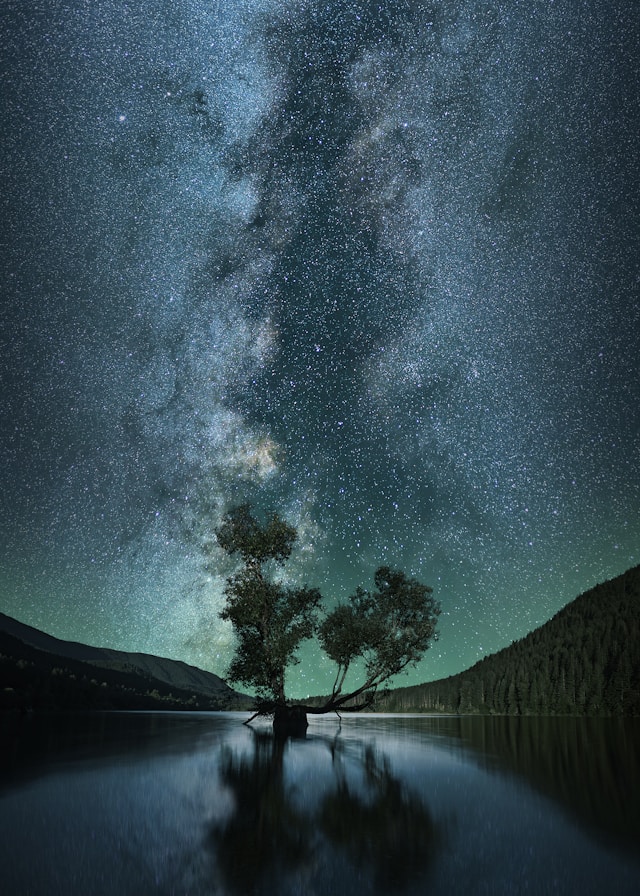
In just 30 seconds I captured the core of our galaxy, the Milky Way, glowing brightly behind a dark wispy haze of cosmic dust.
Deep inside that glow lies a supermassive black hole 4 million times the mass of our Sun.
And stretching out on either side is a smattering of stars: pinpricks of photons that may have travelled millennia before reaching Earth.
It’s a stunning shot, but it wasn’t taken with a telescope or fancy camera.
I used my smartphone. And it’s not even a top-of-the-line one.It was a chilly winter evening outside Cohuna, Victoria, on Barapa Barapa country, where astrophotographer Shayne Mostyn showed me the ropes.
He has taken many first-timers like me out for smartphone astrophotography workshops, and says everyone reacts in wonder when they snap their first photo of the Milky Way.
“It would be pitch black and then all their faces would start lighting up … and you could hear the whole group go ‘wow!'”
Winter in Australia is the best time to take wow-worthy photos of the Milky Way. The cold, crisp night air holds less water vapour than it does during the warmer, more humid summer, so skies at the moment look particularly clear.
And Earth’s current position on its orbit around the Sun means we can now look into the heart of our galaxy at night.
Smartphones, with their wide field of view, are ideal for taking photos of big celestial objects such as the Milky Way.Smartphone astrophotography basics
First up, the obvious: you need a smartphone.
I won’t go into step-by-step set-up details for each make and model — you can look that up online — but you might be surprised at what your phone can do.
And there are a few things to keep in mind, regardless of the phone you use.
For most, Shane says, the camera app that comes with the phone is fine. They usually come with a night mode, which lets you shoot a longer exposure time than a daytime snap, and lets you capture all those tiny dots of starlight.Some models have special astrophotography settings that let you increase exposure time. Others automatically realign the stars so you don’t end up with star trails, where the stars look like streaks in the sky.
But even if you don’t have these options, you can still snap fab photos.
I used an iPhone 14 and its default camera app.
The other piece of must-have equipment is a tripod. This is not negotiable, and is necessary regardless of the phone you use.
For some phones, the long-exposure option only becomes available when your phone is held completely still in a tripod.
It doesn’t have to be expensive either. Just needs to be able to point the phone in a bunch of different directions and hold it still.